How to Practice Drag Racing Reaction Time at Home
Practice drag racing reaction time at home with a random-start drill, a fixed light or phone app, and a timed rep log. Judge progress by average response and consistency, not one quick hit. Bad home practice teaches guessing, which raises red-light risk and hides slow reactions behind lucky runs.
What reaction time means
Reaction time is the span from the green light to the car’s first movement. It is separate from elapsed time, which runs from leaving the line to the finish, and separate again from speed trap data, which covers the final 66 feet. A holeshot win can happen when a better reaction time offsets a slower ET.
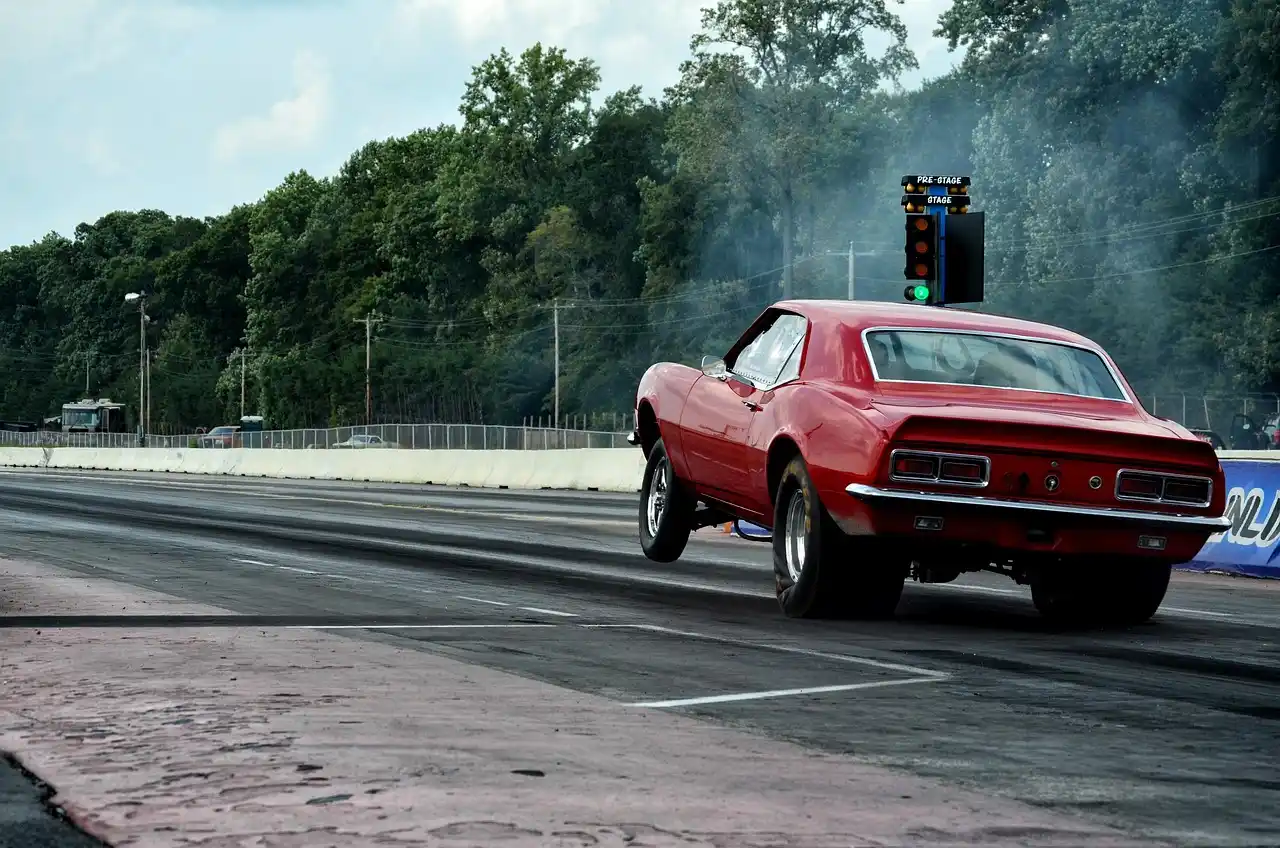
Drag-race starting systems have used electronic timing and speed sensing since the 1960s. On the tree, the car first breaks the pre-stage beam, about 7 inches from the starting line, then the stage beam. The car must stay staged until the start signal. Leaving before green lights the red light in that lane.
That split matters at the strip and at home. A clean launch is not the same thing as a quick reaction. For bracket racers, the goal is a repeatable response that does not depend on guessing.
What you’ll need
- A practice tree or reaction trainer app with a visible start signal
- A phone, tablet, or timer display you can read without moving your head
- A notebook, spreadsheet, or printed score sheet
- A chair or floor marker to keep your body position fixed
- One input method only: thumb tap, finger press, or pedal-style tap
- A quiet space with enough light to see the display clearly
How can you practice at home?
Build the drill around three separate skills: reading the tree, moving on cue, and stopping anticipation. Start with a simple light, then use random delay so you cannot count down by habit, then add pro-tree and sportsman-tree timing. The goal is repeatable reps with a written score, not a fast one-off response.
Suppose a driver always taps after the same pause. A fixed-delay drill can reward that habit, but a random delay exposes it fast. That is useful, because the strip does not give you a countdown you control.
Set up a simple-light drill
- Open the app or light so the start cue appears with no random delay.
- Use about 20 reps and record every response.
- Tap only when the cue changes state, then stop the set after the 20th rep.
This drill teaches cue recognition. Keep the setting the same for the full set so you can see whether the issue is seeing the light or moving cleanly.
Run a random-delay drill
- Switch the trainer to random start delay.
- Run 10 reps with about 10 to 20 seconds between reps.
- Write down each response, plus any early guess or missed cue.
This is the main anti-anticipation drill. If the finger moves before the cue, mark it as a miss rather than a win. That keeps the score honest.
Add pro tree and sportsman tree modes
- Set the trainer to sportsman tree first.
- Complete 10 reps with the same lane and the same input method.
- Then switch to pro tree for another 10 reps and compare the two sets.
Use the same setup for both modes. The comparison only works if the lane, device, and seating position stay fixed.
How to stage and start the drill
For a home drill, staging means locking in a repeatable start position and holding it until the cue appears. Pick one lane, one hand, and one device setting. Stay still through the countdown or random delay, because movement before the cue trains the wrong habit.
The Christmas tree sequence matters here. In sportsman mode, ambers illuminate top to bottom, 0.5 seconds apart, and green comes 0.5 seconds after the last amber. In pro tree mode, three amber lights flash together, then green follows 0.4 seconds later.
- Set the device at eye level or in a fixed sightline.
- Choose left or right lane if the trainer offers it, and keep that choice for the whole set.
- Hold the staging posture still until the signal appears.
- Move on the cue, then reset without rushing the next rep.
Picture a tablet set to sportsman mode with the right lane selected. If the driver leans forward on every rep, the timing changes before the light does. The better drill is the one that removes extra motion.
What is the best practice tree for drag racing reaction time?
Sportsman tree is the better starting point for most beginners because the rhythm is easier to read. Pro tree becomes more useful when you need faster recognition and a shorter gap from amber to green. If your goal is bracket consistency, start with sportsman timing and add pro tree later.
Sportsman tree gives a clear sequence: amber lights in order, 0.5 seconds apart, then green 0.5 seconds after the last amber. Pro tree is the opposite kind of challenge. All three ambers flash at once, and green follows 0.4 seconds later.
Use sportsman tree for rhythm
Choose sportsman mode if you still chase the light or if your timing changes from rep to rep. The extra beat between ambers helps you learn when to release without forcing a guess.
Use pro tree for fast recognition
Choose pro mode when the sportsman sequence feels too slow or too easy to anticipate. The shorter gap rewards quick visual pickup and clean release, but it punishes early movement more often.
Switch based on the target skill
Use sportsman tree for reading and consistency. Use pro tree for sharper cue recognition. Do not switch modes during a set; that mixes the results and makes the log hard to read.
How many reps should you do?
Short sets work better than endless tapping. Use 20 reps for a simple-light set, then 10 reps for random delay, then 10 reps for each tree mode. Rest about 30 to 60 seconds between sets so fatigue does not become the main variable.
Track average response, fastest rep, slowest rep, misses, and redlights. Average shows trend. Fastest and slowest show spread. Misses and redlights show whether you are guessing or moving early.
- Run one set of 20 simple-light reps.
- Rest 30 to 60 seconds.
- Run one set of 10 random-delay reps.
- Rest 30 to 60 seconds.
- Run one set of 10 sportsman-tree reps or 10 pro-tree reps.
- Stop if the last few reps turn sloppy, late, or jumpy.
A good beginner target is improvement in spread, not a single magic number. If the fastest and slowest reps move closer together over several sessions, the drill is doing its job.
How do I avoid anticipating the tree when practicing at home?
To avoid anticipating, remove anything that lets you count the start. Use random delay, keep one input method, and do not whisper a countdown or tap the rhythm before the light. The best correction is to make the cue unpredictable and keep your body still until it appears.
A common first-timer mistake is hitting the button on a habit beat instead of the signal. That can look quick in one set and produce redlights in the next. If the miss rate climbs, slow the pace between reps and return to random delay.
- Turn off any countdown mode and choose random start.
- Set a fixed rest between reps so you do not rush.
- Keep your eyes on the signal, not on your thumb or foot.
- If you flinch, mark it as a miss and reset posture before the next rep.
Common mistakes
Most bad home reps come from guessing, flinching, or changing variables too often. A second problem is input inconsistency: tapping a phone one set, then a tablet, then a timing button. That changes the feel enough to blur the results.
- Guessing before the cue: switch to random delay and mark early movement as a miss.
- Flinching or lifting early: pause for 10 to 15 seconds, reset posture, and restart the rep.
- Changing devices too often: use the same screen and same lane choice for the full set.
- Practicing until sloppy: stop when average response worsens or misses rise.
If that did not fix the problem, drop back to the simple-light drill for 10 reps. Then return to random delay only after the movement is calm and repeatable.
Reaction-time drill worksheet
Use one sheet per session. The point is to compare sets, not to chase a single perfect run. Keep the device, lane, and tree mode written down so later sessions are comparable.
| Drill | Device used | Lane chosen | Tree type | Total reps | Average response | Fastest rep | Slowest rep | Misses/redlights | Notes on anticipation or fatigue |
|---|---|---|---|---|---|---|---|---|---|
| Simple-light drill | Simple light | 20 | |||||||
| Random-delay drill | Random delay | 10 | |||||||
| Tree-specific drill | Pro tree | 10 | Use a second row for sportsman tree if you run both |
Frequently asked questions
What is a good beginner reaction time on a drag strip?
A useful beginner benchmark is consistency first, then gradual tightening of the spread between your fastest and slowest runs. A single lucky light does not prove improvement. On the strip, the better question is whether your average response is repeatable under the same staging and tree conditions.
Can a reaction time app actually help my drag racing?
Yes, if it simulates start timing well enough to train cue recognition and anti-anticipation discipline. The best apps or trainers let you choose pro tree or sportsman tree and, when available, select left or right lane. Treat the result as practice timing, not a direct copy of a real car launch.
Should I practice on a pro tree or sportsman tree at home?
Start with sportsman tree if you are still learning to read the sequence. Move to pro tree after you can stay calm through random delay and avoid early movement. For bracket-style rhythm, sportsman mode is usually the better base; for quicker visual pickup, add pro mode later.
How do I train reaction time without a real car?
Use a trainer app, a fixed light, or a practice tree and make the drill about the cue, not about vehicle motion. Keep one lane, one input, and one body position. Then score the reps the same way every session so the comparison stays fair.
How many practice reps should I do to improve reaction time?
A common session shape is about 20 simple-light reps, 10 random-delay reps, and 10 tree-specific reps. If the last few reps get late, jumpy, or redlight-prone, stop and resume later rather than forcing more.
What equipment do I need to practice drag racing reaction time indoors?
You need a visible start signal, a stable screen or timer, one input method, and a way to log reps. A notebook is enough. A trainer app is helpful if it supports pro tree and sportsman tree modes, and day or night scenes can make the practice feel less repetitive.